
How to Translate Manga for Free with Local Mode
Set up free local manga translation with MetelScan. Download models, choose a language pair and translate on your own device with no account or credit limits.
What you need
Use the MetelScan extension in Chrome or Firefox on a computer, an internet connection for the initial model downloads, and enough storage for the models you choose. Model cards show download sizes and supported languages.
For practical local comic processing, use a device and browser with WebGPU graphics acceleration. In Portal → Local models → Advanced performance, check the device capabilities and leave Processor on Auto. Some model options need graphics acceleration, and CPU-only comic processing can be very slow. There is no single RAM requirement that fits every model.
Select your source and reading language
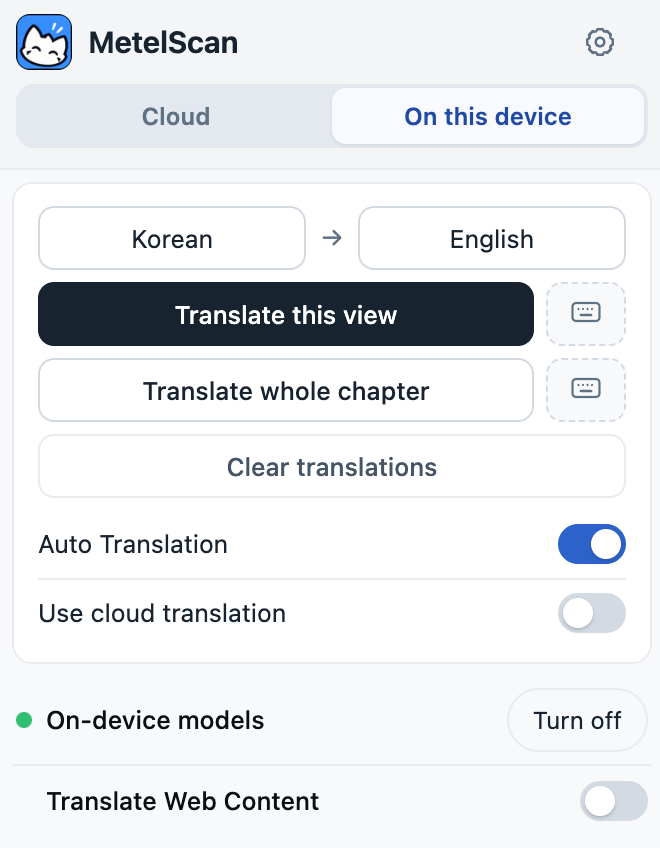
Open a comic tab and the MetelScan popup. Select On this device, choose the original language on the left, and choose your target language on the right. A model must support the language you are asking it to read or translate.
Keep Use cloud translation switched off. That switch sends recognized text to cloud translation even while local models handle other parts of the page; it requires an account and cloud usage.
Install and select the models
Select Set up in the popup’s models row, or open the gear icon and choose Local models in Portal. Work through the categories shown there: OCR reads the letters, Detection finds text areas, Translation changes the language, and Inpainting fills the background behind the original lettering.
Choose models that support your languages and device. Use the model card’s install/select action and let the download and startup finish. If you choose Marian / OPUS, install the translation pair you need. Chrome Translation is a separate option where the browser reports support for that pair.
Use Installed models to review what is stored. You can remove models you no longer need there; removing a model means downloading it again before using it next time.
Return to your chapter and translate
Return to the comic tab and reopen the popup. Turn on on-device models if they are switched off, then select Translate this view. Test a single page before starting a whole chapter.
Local translation has no credit balance or subscription requirement. Once the selected models are downloaded, translation runs in your browser. The comic website may still need an internet connection to load its pages; save chapters in Library for offline reading.